Query language
The grammar the Explore search bar accepts, every operator and function with an example, and the error messages you will see for common mistakes.
Query language
Explore has its own small query language, not raw SQL. You type it in the search bar at the top of Explore; it parses in your browser, and only the parts it can express reach the server.
Why not SQL
An editor that accepts SQL implies joins, subqueries and functions the read path does not implement. upzero's query language spells only what the API can actually do, so a query that parses is a query that runs.
The shape
select <column> [, <column>]* | *
from   logs | traces | metrics
[where <predicate>]
[order by <column> asc|desc]
select * from logs
select timestamp, service_name, body from logs
select * from logs where service_name = 'checkout'
select * from logs where service_name = 'checkout' order by timestamp descEvery one of the examples on this page is pinned by the language's own test
suite (console/app/src/modules/explore/query/*.test.ts). If an example here
stopped parsing, that suite would fail.
Keywords (select, from, where, order by, and, or, asc, desc)
are case-insensitive. Source and column names are case-sensitive, because
they are real backend field names:
SELECT * FROM logs WHERE service_name = 'checkout' ORDER BY timestamp DESCSources and columns
from names one source. Each source has a fixed column set, generated from
the backend's own OpenAPI schema, so it can never drift from what the API
actually returns.
| Source | Columns |
|---|---|
logs | timestamp, trace_id, span_id, service_name, severity_text, severity_number, body |
traces | trace_id, span_id, service_name, span_name, duration_ns, status_code, start_time |
metrics | metric_name, timestamp, value, metric_type, count, sum (only reachable through an aggregate select, see Metrics) |
select bogus_col from logs is rejected with Unknown column 'bogus_col' for source 'logs'., naming the column and the source, not just "invalid query".
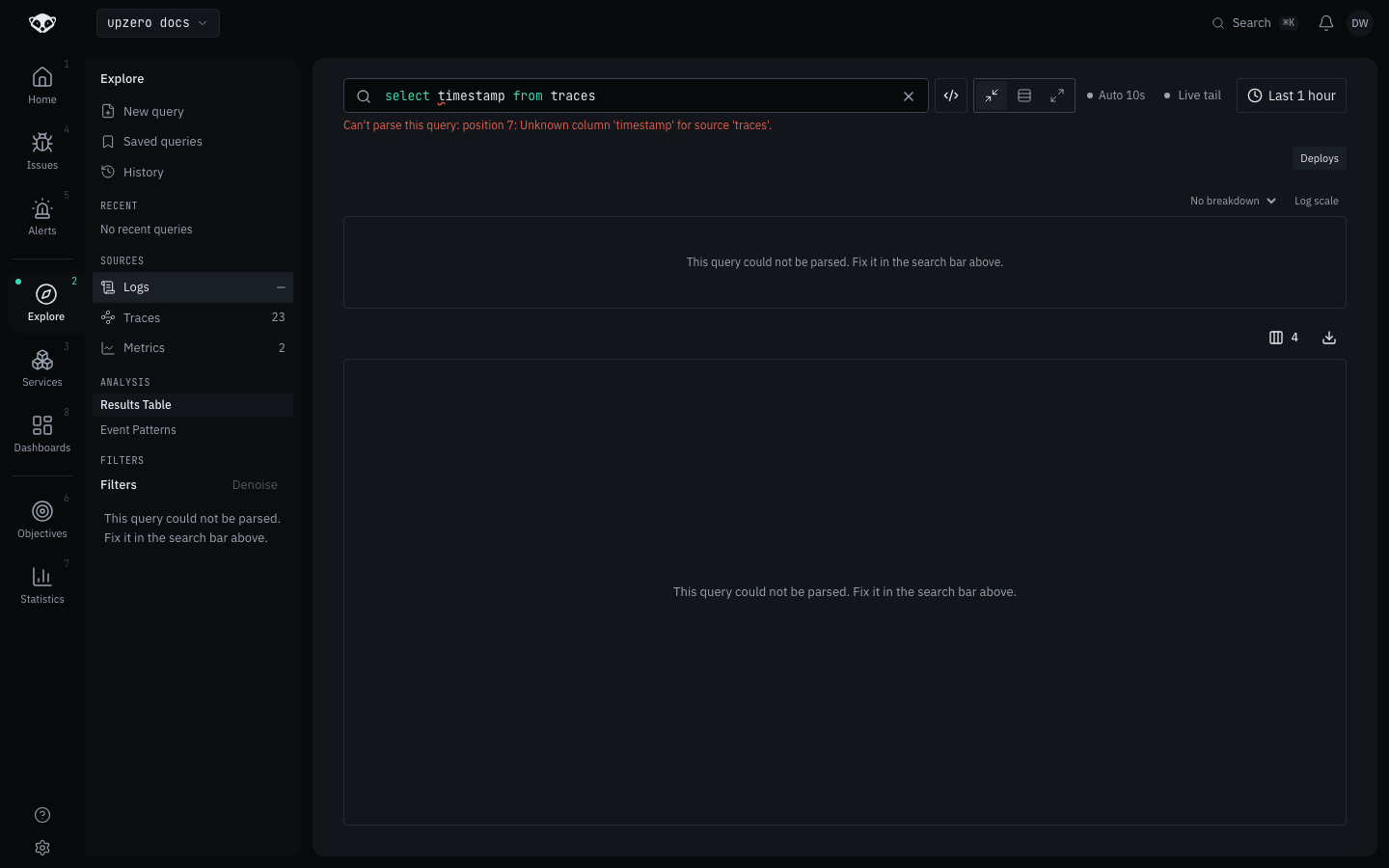
Traces has no timestamp column; it is start_time. This is the single most
common mistake in a hand-written traces query, and the console names it
exactly:
Filtering with where
Three operators, each an example straight from the parser's own tests:
| Operator | Meaning | Example |
|---|---|---|
= | equals | where service_name = 'checkout' |
!= | not equals | where severity_text != 'ERROR' |
~ | contains (substring) | where body ~ 'timeout' |
Values are single-quoted strings. An embedded quote doubles, SQL-style:
select * from logs where body = 'it''s broken'which round-trips to the value it's broken.
Double-quoted strings are rejected by name:
select * from logs where service_name = "checkout"
→ String literals must be single-quoted ('...'), not double-quoted.
Combining predicates
and / or, with parentheses for grouping. and binds tighter than or,
so a or b and c parses as a or (b and c):
select * from logs where service_name = 'a' and severity_text = 'b'
select * from logs where service_name = 'a' or severity_text = 'b'
select * from logs where (service_name = 'a' or severity_text = 'b') and body ~ 'x'
Filtering on an attribute
Your own instrumentation's attributes (http.method, k8s.pod.name, and
anything else your SDK sets) are not fixed columns, so they use a separate
attr: form with a quoted key, since a bare identifier cannot contain the
dot most attribute keys have:
select timestamp, body from logs where attr:'http.method' = 'GET'
select timestamp, body from logs where attr:'http.method' != 'GET'
select timestamp, body from logs where service_name = 'checkout' and attr:'http.method' = 'GET'
An attribute match is always exact. attr:'http.method' ~ 'GE' is rejected
with '~' is not supported on an attribute — attribute matching is exact. Use '=' or '!='. The backend's attribute lookup is a map equality check, so
there is no substring form to offer.
Leaving the key unquoted gets a guidance message rather than a cryptic parse
failure: attr:method = 'x' fails with Expected a quoted attribute key after 'attr:', ... Attribute keys contain dots, so they are always quoted: attr:'http.method'.
Sorting
order by takes exactly one column and a direction, both required. There is
no default direction to fall back on:
select * from logs order by timestamp descOnly the source's own time column sorts: timestamp for logs, start_time
for traces. Anything else is rejected client-side rather than round-tripped
to the API for the same 400, because the result is bucketed by a keyset
cursor that is typed against that one column.
Aggregating metrics
select accepts one aggregate call in place of a column list, for the
metrics source:
select avg('example.queue.depth') from metrics
select quantile('example.http.duration', '0.95') from metrics
select avg('example.queue.depth') from metrics group by 'route'
The function is one of a fixed set (sum, avg, min, max, count,
quantile), never a caller-named function. quantile is the one that takes
a second argument, the threshold, as a fraction between 0 and 1:
select quantile('http.server.duration') from metrics
→ quantile(...) requires a threshold argument, e.g. quantile('http.server.duration', '0.95').
The metric name and every group by key are quoted string literals, the
same reasoning as an attribute key: a metric name routinely contains a dot
(http.server.duration).
group by only makes sense next to an aggregate select. A plain column list
or select * has nothing to group:
select * from logs group by 'service_name'
→ GROUP BY requires an aggregate select (e.g. avg('metric')) — a plain column list has nothing to group.
Aggregation is gated per source, at parse time, not left to fail later at
compile or on the server. Today that means logs and traces refuse an
aggregate select outright, in plain terms:
select avg('http.server.duration') from logs
→ Aggregation is not supported for 'logs'.
The alternative, letting it parse and only failing once it reaches the server, is exactly the over-promising ADR-0016 rejects raw SQL for: a query that looks like it worked right up until a dead end. See Metrics for what the aggregate form actually compiles to and the encoding rules that govern which aggregation returns data.
What is deliberately not supported
Each of these is rejected by name, not silently ignored or misread:
| Construct | Example | Message |
|---|---|---|
| Joins | select * from logs join traces on x | JOIN is not supported — the query language has no joins across sources. |
| Subqueries | where (select service_name from logs) | Subqueries are not supported — a query is a single select/from/where/order by statement. |
| Functions in a predicate | where count(service_name) = '1' | Functions are not supported (found 'count('); filter on a plain column instead. |
having | having service_name = 'x' | HAVING is not supported — there is no post-aggregation filter in this query language. |
limit | limit 10 | LIMIT is not supported — pagination is handled by scrolling the results, not by the query. |
limit names why rather than just refusing: paging through results is the
table's own scroll, not something the query controls.
Several problems in one query are all reported, not just the first, which helps when you are fixing a query with more than one typo:
select bogus_one, timestamp, bogus_two from logs
→ Unknown column 'bogus_one' for source 'logs'.
→ Unknown column 'bogus_two' for source 'logs'.
Reading a query back in plain English
Under the search bar, Explore restates whatever currently parses as one line of English. It stays visible even while the query does not yet compile (see Logs for the compile step), so you get feedback the moment the syntax is valid:
| Query | Reads as |
|---|---|
select * from logs | logs |
select timestamp, service_name from logs | logs (showing timestamp, service_name) |
select * from logs where service_name = 'checkout' | logs where service_name is checkout |
select * from logs where severity_text != 'ERROR' | logs where severity_text is not ERROR |
select * from logs order by timestamp desc | logs, newest first |
select avg('example.queue.depth') from metrics | avg(example.queue.depth) over metrics |
Where the language is used
The same grammar drives every text-entry surface in Explore: the search bar,
a saved query's stored text, and a shared link's q parameter. It is
parsed, printed and compiled entirely in the console
(console/app/src/modules/explore/query/). Nothing about the grammar itself
lives on the backend. What the backend receives is the compiled result:
typed parameters where one exists (service_name, severity_text,
status_code), and a small Lucene-subset q string for everything else.
This is also why up0 tail --query on the terminal is a different,
smaller language, not this one. See From the terminal.
--query talks directly in the compiled q form (bare words, key:value,
AND/OR/NOT); it has no select/from/where structure of its own,
because the CLI streams one source at a time and never needed a source
clause to disambiguate.