Deployments and GitHub correlation
The CLI flow, the GitHub App flow, deployment markers in Explore and on issues, and the idempotency rule.
Deployments and GitHub correlation
A deployment is a fact your CI system (or GitHub) reports after a release
happens, not something you declare in advance. It has no manifest and is
not a Kind: nothing configures a deployment
that "should" happen, the way a Monitor manifest configures a check that
should run. There are two ways a deployment row gets written, the CLI and
GitHub App webhooks, and once it exists, upzero uses it to mark charts and
attribute issues to the release that likely caused them.
Reporting from the CLI
up0 deploy is the CI-facing surface: two calls, create at the start of a
release and finish at the end.
up0 deploy create \
  --service checkout \
  --version v1.2.3 \
  --commit abc123def456 \
  --environment production \
  --idempotency-key "github-actions:4821"
This prints the new deployment's id. When the release finishes:
up0 deploy finish <deployment-id> --status succeeded--status is one of succeeded, failed or rolled_back.
--idempotency-key is required
The CLI never invents one. A CI retry has to replay the exact same key so a
flaky pipeline step doesn't create a second deployment row for the same
release. If your pipeline runs under GitHub Actions, GitLab CI, CircleCI or
Buildkite, the CLI detects the environment and derives the key from that
system's own run id automatically. --idempotency-key is only mandatory
when no recognised CI environment is present.
List what has been reported so far:
up0 deploy list --service checkout --environment productionWalked against the kind cluster (2026-09-16):
$ up0 deploy create --service 1647-gateway --version v1.2.3 \
    --commit abc123def456 --environment production \
    --idempotency-key docs-1647-walk-1 --json
{"id": "cb8cd566-...", "service_name": "1647-gateway", "version": "v1.2.3",
 "status": "in_progress", "source": "cli", ...}

$ up0 deploy finish cb8cd566-... --status succeeded --json
{"id": "cb8cd566-...", "status": "succeeded",
 "finished_at": "2026-09-16T12:58:13Z", ...}
The source field on a CLI-created row is always "cli". It is a
self-reported observability label, not a security boundary, since a curl
call with the same bearer token is indistinguishable from the CLI at the
network level.
The GitHub App flow
Reporting deployments from GitHub does not need your organization's
GitOps connection (the repository that
declares your Monitor/Rule/Service manifests). It is a second,
lighter install, scoped to the repository whose deploys you want tracked,
under Settings → GitHub in the Source Code Repos section:
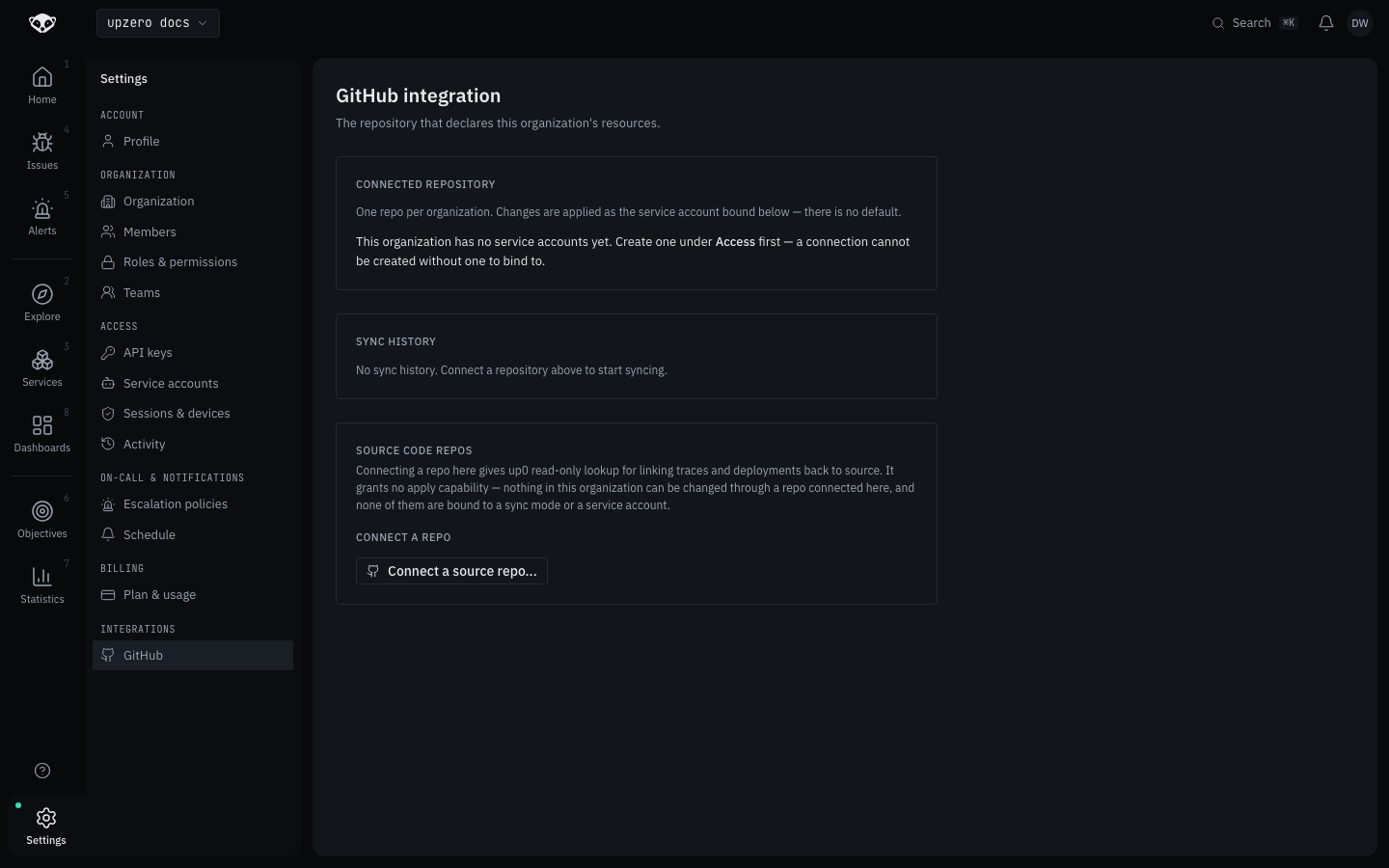
"Connect a source repo" installs the same GitHub App used for GitOps sync,
but the connection this creates (source_repo_connections) has no sync
mode and no bound service account, and no code path ever applies a manifest
through it. It grants upzero read-only lookup against that repository:
resolving a commit link, and (what this page covers) receiving deployment
webhooks. Nothing in your organization can be changed through a repo
connected this way.
Which webhook events matter
A connection ingests nothing by default. Deployment ingestion is opt-in per connection, across three event families:
| Family | GitHub events | What it captures |
|---|---|---|
deployment | deployment, deployment_status | The Deployments API: a deployment object plus its status transitions (success/failure/error) |
workflow_run | workflow_run | A GitHub Actions workflow run reaching a final conclusion |
release | release | A published release |
Enabling a family is an API call today
The console's connect flow creates the repository connection itself, but
choosing which event families it ingests currently has no console control.
Set it with PATCH /api/v1/me/gitops/source-repos/{connection_id} and an
event_families array of any of deployment, workflow_run, release.
A connection with none of the three set never ingests a deployment,
which is also the safe default every pre-existing connection has.
Enable only the family that matches how the repository actually deploys.
Enabling both deployment and workflow_run for a repo that uses the
Deployments API and tags a release-triggering workflow would record the
same release twice, once per family.
Environment defaults when GitHub's payload doesn't carry one: deployment
and deployment_status events fall back to production (matching GitHub's
own server-side default). workflow_run and release carry no environment
concept at all, and default to unknown rather than guessing
production. A staging deploy reported through either would otherwise
silently show up under the wrong environment.
For a repository with more than one deployable service, the connection's
service mapping resolves which service a delivery belongs to. With no
per-event signal to match against (always true for release; usually true
for workflow_run), a connection with exactly one mapped service falls
back to it; two or more mappings and no candidate leaves the event
unmapped, acknowledged and dropped rather than guessed.
The idempotency rule
Every deployment row is deduplicated on (org_id, source, idempotency_key).
For GitHub deliveries, the key written is never the bare id GitHub sent.
It is prefixed with the event family: "{family}:{id}", for example
deployment:90002 or workflow_run:90002.
This matters because GitHub's ids are independent per-family counters. A
workflow_run.id and an unrelated deployment.id can land on the exact
same number by coincidence, and without the family prefix one would be
silently treated as a replay of the other. Prefixing keeps each family in
its own namespace within the same organization and source.
For the CLI, the same uniqueness holds with source = "cli" and whatever
key you passed (or the CI-derived one), a retried pipeline step replays
the same row instead of creating a duplicate.
Deployment markers
Once a deployment exists, it shows up as a marker wherever a chart plots that service over a window covering the deployment's start:
- On any Explore chart (metrics or the trace histogram).
- On the golden-signal charts on a service's detail page.
Hovering a marker shows the service name, a status badge, the version, the commit (linked to the source repository when one is connected), the environment, and when the deployment started.
On an issue, when upzero has attributed the issue to a deployment, the issue detail page shows the version, the linked commit, and how long after the deployment the issue started. Not every issue carries this: attribution needs a deployment on the same service within the attribution window, so most issues on services with no connected deployment source show no attribution section at all, rather than an empty "no deployment" row.
Not walked with a real GitHub App here
The CLI flow above was run against the kind cluster. The GitHub App flow
needs a real GitHub App install and a live webhook delivery, which this
task's environment cannot drive end to end. Only the empty connection
screen was captured. The event families, environment defaults, and
idempotency key format above come from deployment_ingest.py and its
governing docs, not from an observed webhook delivery.